Keep pages tidy with tabs
Tabs let you split a page into clean sections so you can keep related content together without a long vertical scroll. Type /tabs to get started.
See the announcement on X →

及时了解最新版本、改进和修复。
Tabs let you split a page into clean sections so you can keep related content together without a long vertical scroll. Type /tabs to get started.
See the announcement on X →

通过“归档”功能,你可以将页面标记为过时,从而使工作空间保持整洁并优化搜索结果。
已归档页面上会显示一个横幅,说明由谁在何时将其归档,并且这些页面默认不会出现在搜索结果、侧边栏和数据库视图中。归档上级页面后,其下级页面也会自动归档。
要将页面归档,请点击页面右上角的 ••• 并选择“归档”。
请访问我们的帮助中心以了解更多 →
This month, we have a champagne problem: our engineers are shipping faster than ever, which means Notion 3.4 has too much to cover in a single email.
So let’s start with the fundamentals, like a new dashboard view for your databases, a completely redesigned sidebar (opt-in to try it out!), presentation mode that turns any doc into a slideshow, and a lot more.

Bring together charts, KPIs, and metrics into one beautiful dashboard, so you can see what’s up and what’s changed. Much easier to create and maintain versus a workaround like a page of linked views.
To get started, try describing the dashboard you want to your Notion Agent. It can build and update for you! Available on Business & Enterprise plans. Learn more →
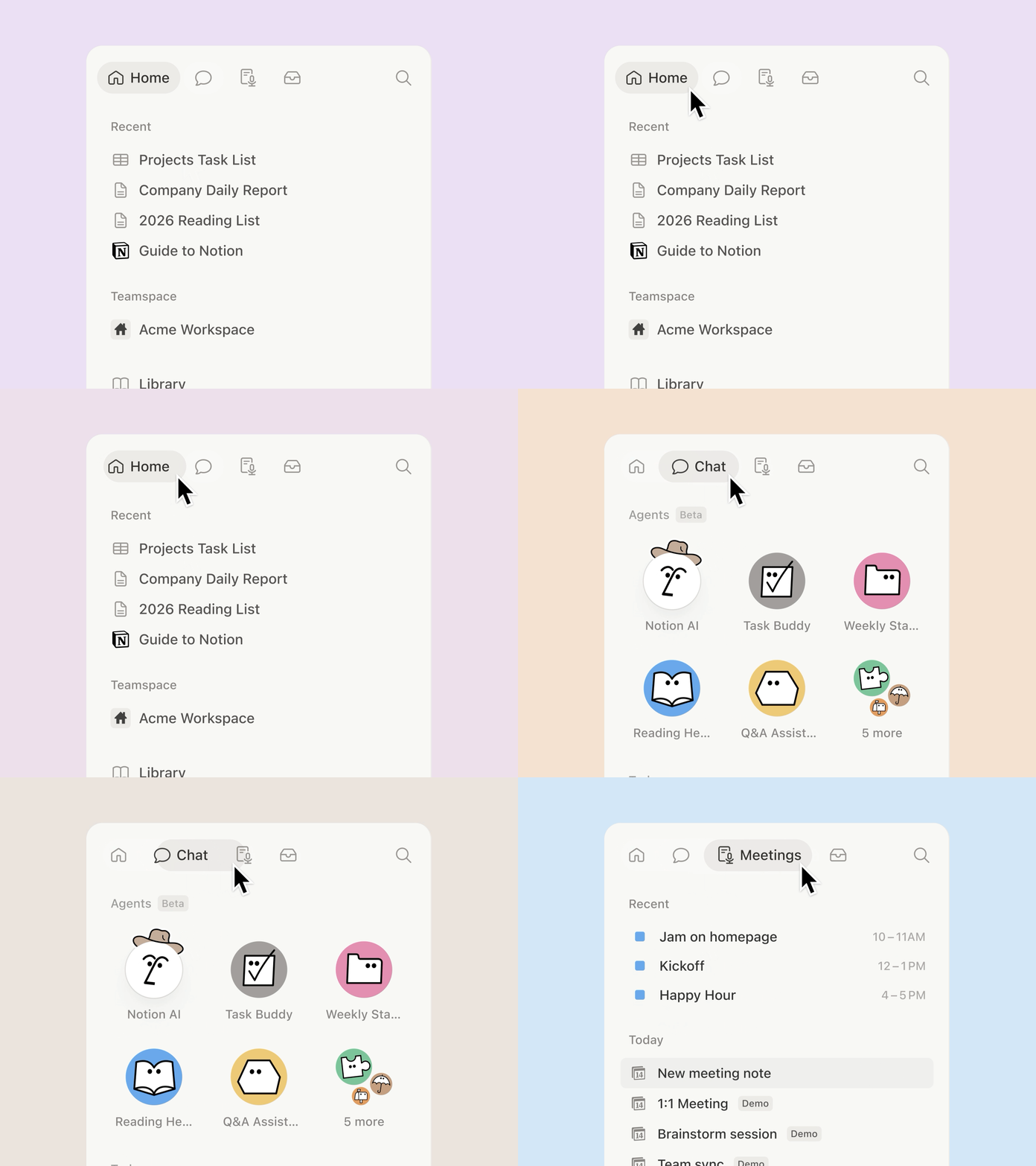
The sidebar was getting far too crowded. So we organized it into four new tabs, with easy access to your pages, agent chats, meetings, and notifications. And it’s way more customizable: you decide which sections to toggle on and off.
If you want a quick tour, take a look at Jon's walkthrough. Be among the first to try it by opting in, and let us know what you think!
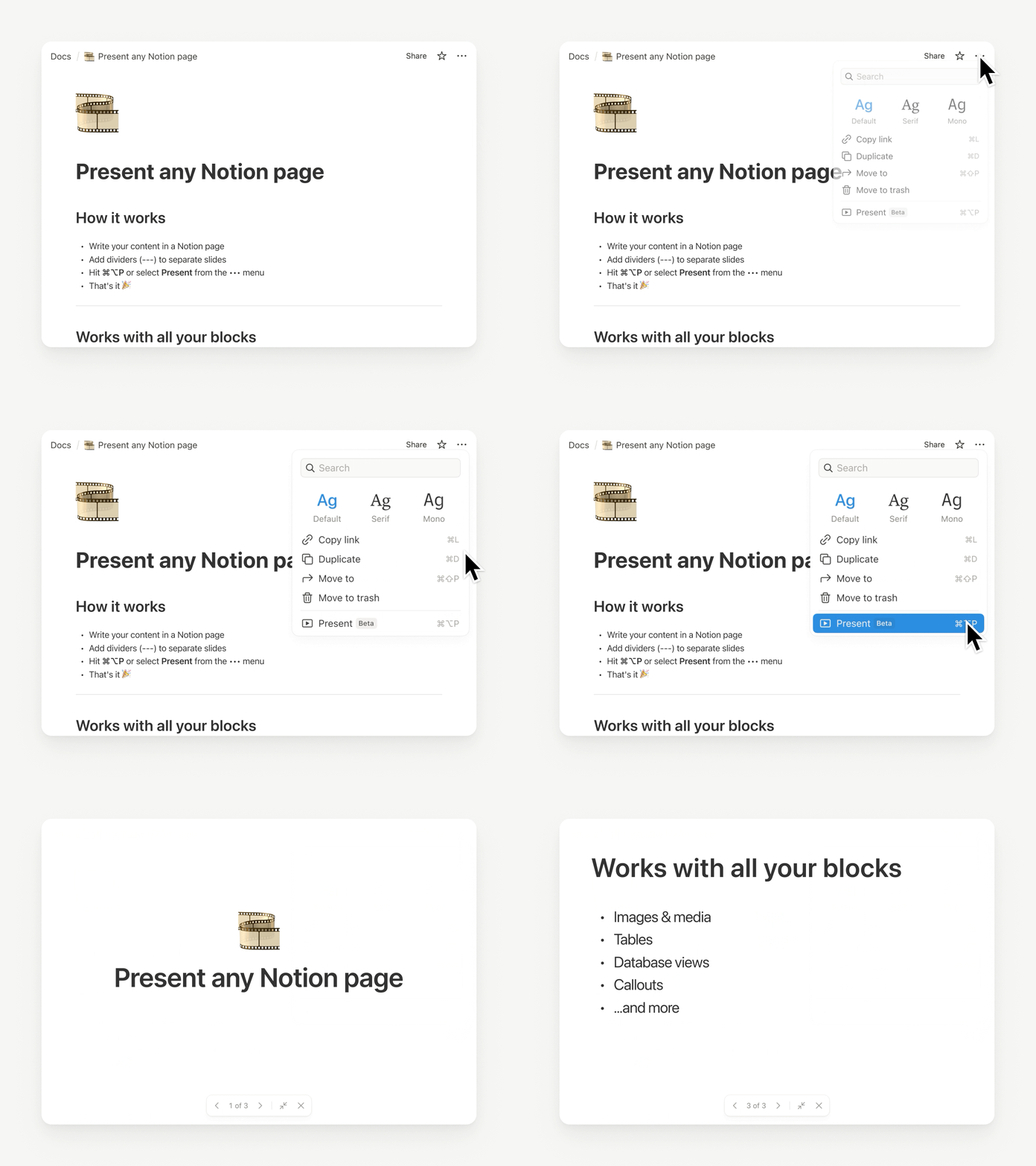
Presentation mode started in a very Notion way: Randy and Cole on our design team woke up one day and decided, “presenting a Notion page should be easy… and fun.” So they built it. Now, you can present directly from a page without having to rebuild your work. Try it with the shortcut ⌘ + opt + p on Mac, or Ctrl + alt + p on Windows.
It’s currently in beta for everyone on Plus, Business, and Enterprise. Check out Randy’s demo.

Notion HQ had an internal “tabs” block for years, but the secret finally got out. Time to set it free. Now you can organize content into clean, clickable sections, without the maze of subpages. Check it out.

Generate images right where your work lives, so visuals stay connected to the plan, the brief, and the decisions behind them. It’s the Notion way: iterate in context, remix what’s on the page, and turn text into everything from process diagrams to onboarding visuals in seconds. Just ask your agent. Here’s how you can get started.

Keep your workspace clean as it grows: now you can mark old pages as archived instead of deleting them, so they stay accessible without cluttering search and navigation. Archived pages are hidden from search by default, so they’re a great tool to improve your team’s AI responses.
H4 headers: Smaller than H3, bigger than text.
Markdown Content API: Markdown tools can now read and write Notion directly, which makes integrations simpler and more reliable.
SDK improvements: Integrations are now easier to build and more reliable, with automatic retries, Markdown and Meeting Notes support, and clearer setup warnings, so workflows break less often and ship faster.
Tell us what’s working (and what you want next). We’re building fast.
Cheers,
Ivan
P.S. Notion 3.4 also includes an exciting list of upgrades for Notion AI that are already rolling out now. I’ll send a note about that soon. In the meantime, you can watch this video.
P.P.S. If you’ve been curious about Custom Agents, now’s a good time to try them for free through May 3, 2026. Get started here.
自定义技能可以将任何重复性的 AI 任务转化为易于调用的指令。你可以通过文本选择菜单使用自定义技能,或在代理对话中直接用 @提及进行调用。技能本质上是页面,所以你的整个团队都可以共享并在其基础上进行扩展。
如需将页面指定为技能,请打开“…”菜单,选择与 AI 一起使用→用作 AI 技能。你可以在设置→Notion AI→通用中管理所有技能。
适用于商业版和企业版方案。
查看 X 平台公告 →
Notion 学院的视频和认证课程现已支持 6 种新语言——西班牙语、葡萄牙语、日语、韩语、法语和德语。这意味着全球学习者现在都可以访问新增的本地化视频、模板、测验和练习内容。
此次上线离不开我们全球合作伙伴的协作支持,他们参与了每一条学习路径的构建与测试。感谢 Onepoint、Marie Goutron、Lou Attal、Marie-Morgane Chabert(法语)、Hint、Elena Madrigal、La Agencia AI(西班牙语)、Keywalker、Nextmode、NRI(日语)、Alest、Baltazzar(巴西葡萄牙语))等合作伙伴!你也可以在我们的“市集”中查找合作伙伴并与之预约时间。
立即查看 Notion 学院新上线的所有语言 →
自定义指令可让你精准设定 AI 速记的摘要生成方式,确保会议结束后能获得最有价值的记录。你可以分享团队和项目背景信息以提高内容的准确性,也可以设定结构、语气和篇幅,打造符合需求的内容输出格式。
前往任意 AI 速记区块的底部,选择指令即可开始使用。
查看 X 平台公告 →

工作空间所有者现在可以设置全局政策,用于管理 AI 速记的音频授权。开启此功能后,每次转录开始时将自动播放一段同意声明,告知其他参会者你正在使用 AI 速记。
管理员可随时前往设置 → Notion AI → AI 速记,选择“强制为所有工作空间成员播放同意声明”选项进行更新。
请访问我们的帮助中心,了解更多详情 →

现在,你可以使用 Notion AI 直接在工作空间内快速查找 Salesforce 数据(包括客户、销售线索、商机和联系人),所有信息尽收眼底。你可以询问关于销售漏斗、交易历史的问题,或快速获取联系人摘要,全程无需离开 Notion。前往 Notion AI 设置中找到 AI 连接器即可开始使用。
请访问我们的帮助中心,了解更多详情 →
Dashboard views are a new database view for better visibility and context. This lets teams (and agents) easily assemble beautiful, glanceable overviews directly on top of their databases. Combine multiple views, KPIs, and key properties into one “control panel” so you can see what matters at a glance and act quickly.
Available on Business and Enterprise plans.
Notion AI can now generate and edit images right on your page. Create cover images, realistic photos, styled charts, diagrams, and slide visuals, then refine them with follow-up prompts until they look just right. Just type /ai image or ask Notion AI in chat.